
Introduction
For many years, traditional content management systems have enabled businesses to launch websites quickly by extending functionality through plugins. Whether you need SEO tools, contact forms, image optimization, analytics, ecommerce capabilities, multilingual support, or page builders, there is usually a plugin available.
At first, this approach seems ideal. You install a CMS, add the plugins you need, and your website is ready.
However, as your website grows, so does the number of plugins. A typical business website can easily rely on 20–50 plugins, while larger ecommerce sites may use even more. Each plugin introduces additional code, dependencies, updates, and potential security risks.
Over time, managing plugins often becomes one of the biggest challenges for website owners and development teams.
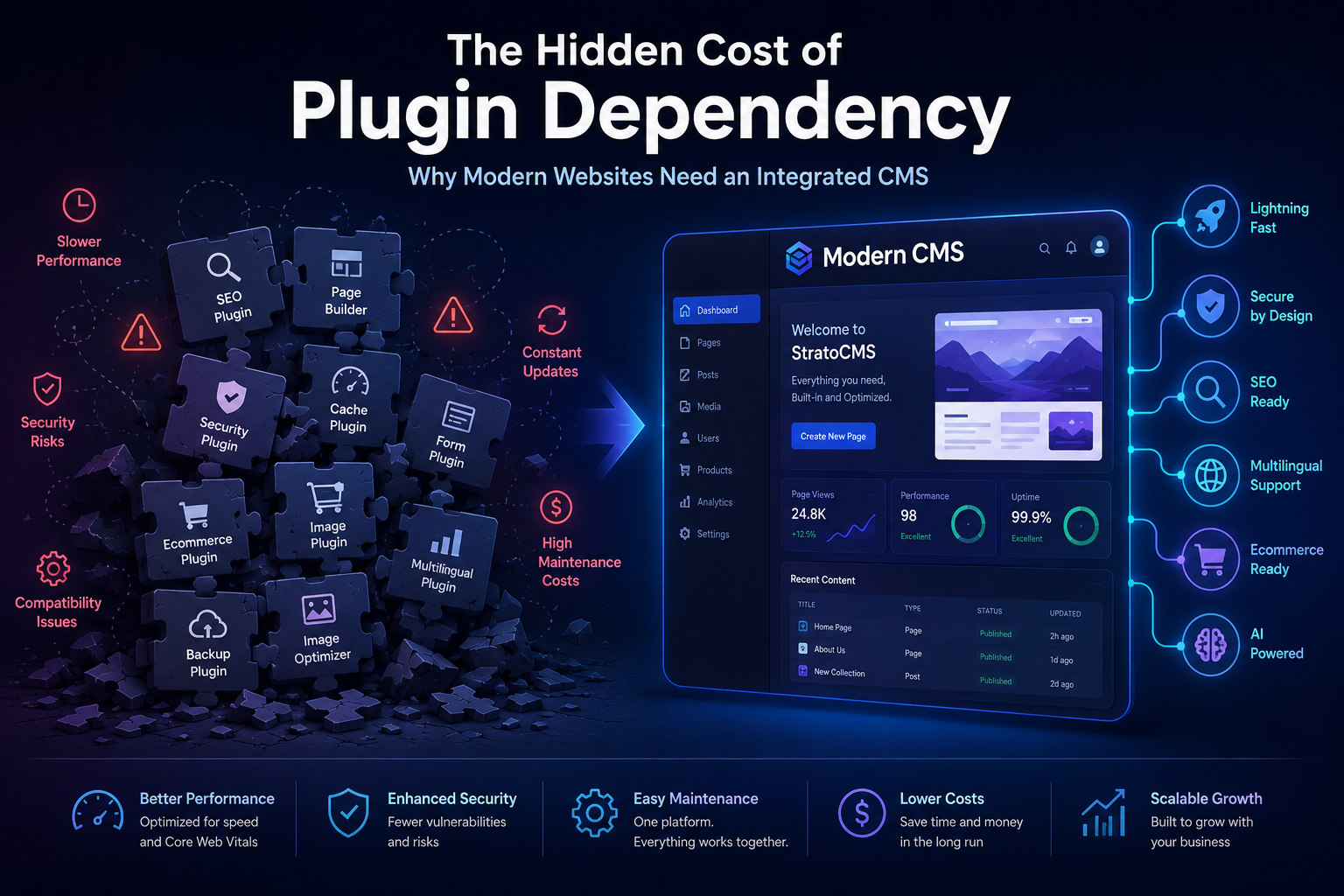
This article explores the hidden costs of plugin dependency and explains why many businesses are choosing integrated CMS platforms that include essential features out of the box.
What Is Plugin Dependency?
Plugin dependency occurs when a website relies on multiple third-party plugins to provide essential functionality.
Examples include:
SEO optimization
Contact forms
Ecommerce
Image compression
Caching
Security
Analytics
Page builders
Multilingual support
Backups
Social sharing
Email marketing integrations
Each plugin may solve a specific problem, but together they create a complex ecosystem that requires ongoing management.
Why Plugins Became So Popular
Plugins have transformed website development by making advanced features accessible without custom coding.
Benefits include:
Faster development
Lower initial costs
Large plugin marketplaces
Easy installation
Feature flexibility
For small websites, plugins can be a practical solution. However, as websites grow, the limitations of relying on numerous plugins become more apparent.
The Performance Impact
Every plugin adds extra code that browsers must download, process, and execute.
This often results in:
Additional JavaScript files
Extra CSS files
More database queries
Increased HTTP requests
Larger page sizes
As these accumulate, page load times increase.
Slow websites can lead to:
Higher bounce rates
Lower user engagement
Reduced conversions
Poor Core Web Vitals
Lower search visibility
Even a one-second delay in page load time can significantly affect user experience and business outcomes.
Security Risks
Every plugin expands your website's attack surface.
Potential risks include:
Outdated plugins
Vulnerabilities
Poor coding standards
Unsupported plugins
Incompatible updates
A single vulnerable plugin can expose sensitive data or compromise the entire website.
Maintaining security often requires constant monitoring and timely updates.
Compatibility Challenges
A common issue with plugin-based websites is compatibility.
Imagine updating your CMS. Suddenly:
Your page builder stops working.
Your contact forms break.
Ecommerce functionality behaves unexpectedly.
Styling changes across the site.
These issues arise because plugins are often developed independently, making compatibility difficult to guarantee.
Maintenance Becomes Time-Consuming
Running a website involves more than creating content.
Website owners frequently need to:
Check for updates
Test compatibility
Create backups
Monitor errors
Restore failed updates
Resolve plugin conflicts
Instead of focusing on business growth, valuable time is spent maintaining the technology stack.
Increasing Development Costs
Plugins may appear inexpensive initially, but long-term costs can accumulate through:
Annual licenses
Premium upgrades
Custom development
Technical support
Emergency fixes
Over several years, these expenses can exceed the cost of a platform with integrated functionality.
The User Experience Suffers
Different plugins often introduce inconsistent interfaces.
Content editors may encounter:
Multiple dashboards
Different design patterns
Separate settings pages
Confusing workflows
This increases the learning curve and reduces productivity.
A unified CMS offers a consistent editing experience across all features.
Scalability Challenges
As businesses expand, websites must support:
More traffic
More users
Larger media libraries
Additional content
Multiple languages
Ecommerce operations
Plugin-heavy websites may struggle to scale efficiently, requiring continuous optimization and infrastructure improvements.
SEO Implications
Website performance is closely tied to SEO.
Plugin overload can negatively impact:
Page speed
Mobile experience
Core Web Vitals
Crawl efficiency
User engagement
Search engines prioritize websites that deliver fast and reliable experiences.
The Integrated CMS Approach
Modern CMS platforms increasingly provide essential features without relying heavily on third-party plugins.
Typical built-in capabilities include:
Visual page builder
SEO tools
Media management
Forms
User management
Multilingual support
Analytics integration
Ecommerce functionality
API access
Security features
Having these capabilities built into the platform reduces complexity and creates a more streamlined experience.
Benefits of an Integrated CMS
Organizations adopting integrated CMS platforms often benefit from:
Faster Websites
Reduced code and optimized architecture improve loading times.
Improved Security
Fewer external dependencies reduce potential vulnerabilities.
Easier Maintenance
With fewer components to manage, updates become simpler and more predictable.
Better User Experience
Editors work within a consistent interface instead of navigating multiple plugin dashboards.
Lower Long-Term Costs
Integrated functionality can reduce licensing fees and ongoing maintenance expenses.
Greater Reliability
Features designed to work together minimize compatibility issues.
When Plugins Still Make Sense
Plugins remain valuable in certain scenarios.
They can be appropriate for:
Small personal blogs
Temporary projects
Niche integrations
Rapid prototyping
The key is to use them thoughtfully rather than relying on dozens of plugins for core functionality.
Choosing the Right CMS
Before selecting a CMS, consider these questions:
Does it include the features I need?
Can it scale with my business?
Is it secure?
How easy is it to maintain?
Will my team find it easy to use?
Does it support SEO best practices?
How well does it perform under load?
What are the long-term costs?
The answers will help you choose a platform that supports your business for years to come.
How StratoCMS Addresses These Challenges
At StratoCMS, we designed the platform with simplicity, performance, and scalability in mind.
Instead of depending on numerous third-party plugins, StratoCMS provides many essential capabilities directly within the platform, including:
Visual page builder
SEO management
Media library
Forms
User roles and permissions
AI-powered tools
Multilingual support
Ecommerce capabilities
Fast, optimized architecture
Secure content management
By reducing dependency on external plugins, businesses can focus on creating great digital experiences rather than maintaining complex software stacks.
Final Thoughts
Plugins have played an important role in the evolution of content management systems. They offer flexibility and make it easy to extend functionality when needed.
However, as websites become more complex, relying on a large collection of plugins can introduce challenges related to performance, security, compatibility, maintenance, and long-term costs.
Modern integrated CMS platforms take a different approach by providing essential features within a unified system. This simplifies website management, improves reliability, and helps businesses scale more efficiently.
When evaluating a CMS, don't just compare features—consider the long-term impact on performance, maintenance, and your team's productivity.
The right platform should help your business grow, not create additional work.
About StratoCMS
StratoCMS is a modern, AI-powered content management system built for businesses, agencies, and developers who need fast, secure, and scalable websites. With built-in tools for SEO, content management, multilingual support, ecommerce, and visual editing, StratoCMS helps teams deliver exceptional digital experiences with less complexity.
Build your next website on StratoCMS
Get Started →
Performance-first CMS with AI layouts, built-in SEO and ecommerce.